Who to get back to: Today
On this page
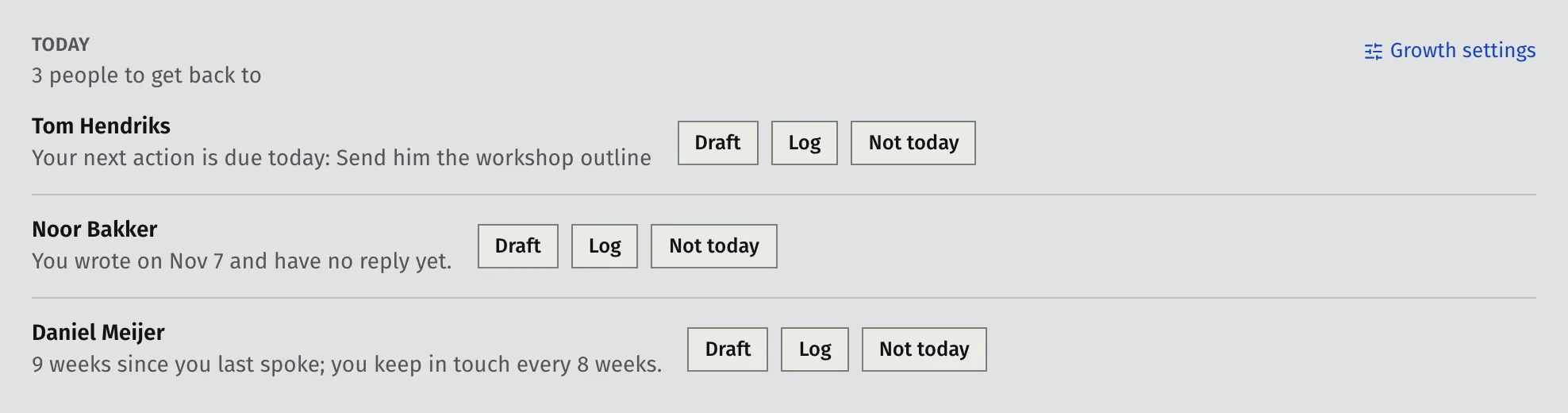
Today is a short list of the people to get back to, each with the reason. It sits above your contact list. Work through it first each day. The list keeps refilling as people come due, so 15 to 30 minutes a day here is a good habit.
The list is short on purpose. It shows 3 or 5 people, so you start with a few real conversations and not a long list.
Where you see it
- On Contacts, as the Today band above the list. It says how many people to get back to.
- On the Dashboard, as Contacts to follow up, with up to three people.
If nobody is due, you see “Nobody to get back to today. You’re up to date.”
Why someone shows up
Each row says why. These are the reasons:
- Your next action is due or overdue. You set it when you logged something, or on the contact.
- You wrote and have no reply. You sent a message or an email, nothing is booked, and the follow-up time has passed. The default is 1 week.
- Time since you last spoke. It has been longer than the rhythm for that person. See Set how often to stay in touch.
- Imported and not in touch yet. The person came from an import, has a relationship set, and you have never been in touch.
- A moment from your coaching. Faronto reads your coaching data and suggests a good time to ask:
- Goal reached: a coaching client reached what they set out to do in the last 3 weeks. Ask for a referral or a testimonial.
- Package nearly done: one session left, or the package ends within 30 days, and no other package follows it. Ask how coaching has gone.
- Past clients: 3 months after your work with a client ended, then every year. The row stays up for a month.
- Lead gone quiet: 30 days after a proposal, a call or a meeting with no contact since and no call booked, for a lead or someone in conversation.
A moment shows once each time it happens. If you log anything with that person after it starts, it counts as handled.
The order is: overdue next actions, replies you are waiting for, moments, then rhythm reminders. Faronto keeps one row for a coaching moment and one for an imported contact you haven’t contacted, so they don’t crowd out the rest.
People you set to Cold never show up, and neither do archived contacts.
What you can do with a row
- Draft opens a window where Faronto’s AI drafts a message for you. See Let Faronto draft a message in your voice.
- Log records what you did or how they answered. When the person’s next action is due, the form already ticks Mark the next action done: …, so saving also marks that action done. The person leaves Today and the next one moves up. Press Undo in the message that appears to take back both the entry and the done mark. See Log a message, call or meeting and Ask for referrals and testimonials.
- Not today takes the person off the list for now. They return once your follow-up time has passed, if the reason still applies. Press Undo in the message that appears to bring them back at once.
- For a moment, the message also offers Stop “…”. It switches that moment off for good. Turn it back on under Settings, Growth.
Change what Today suggests
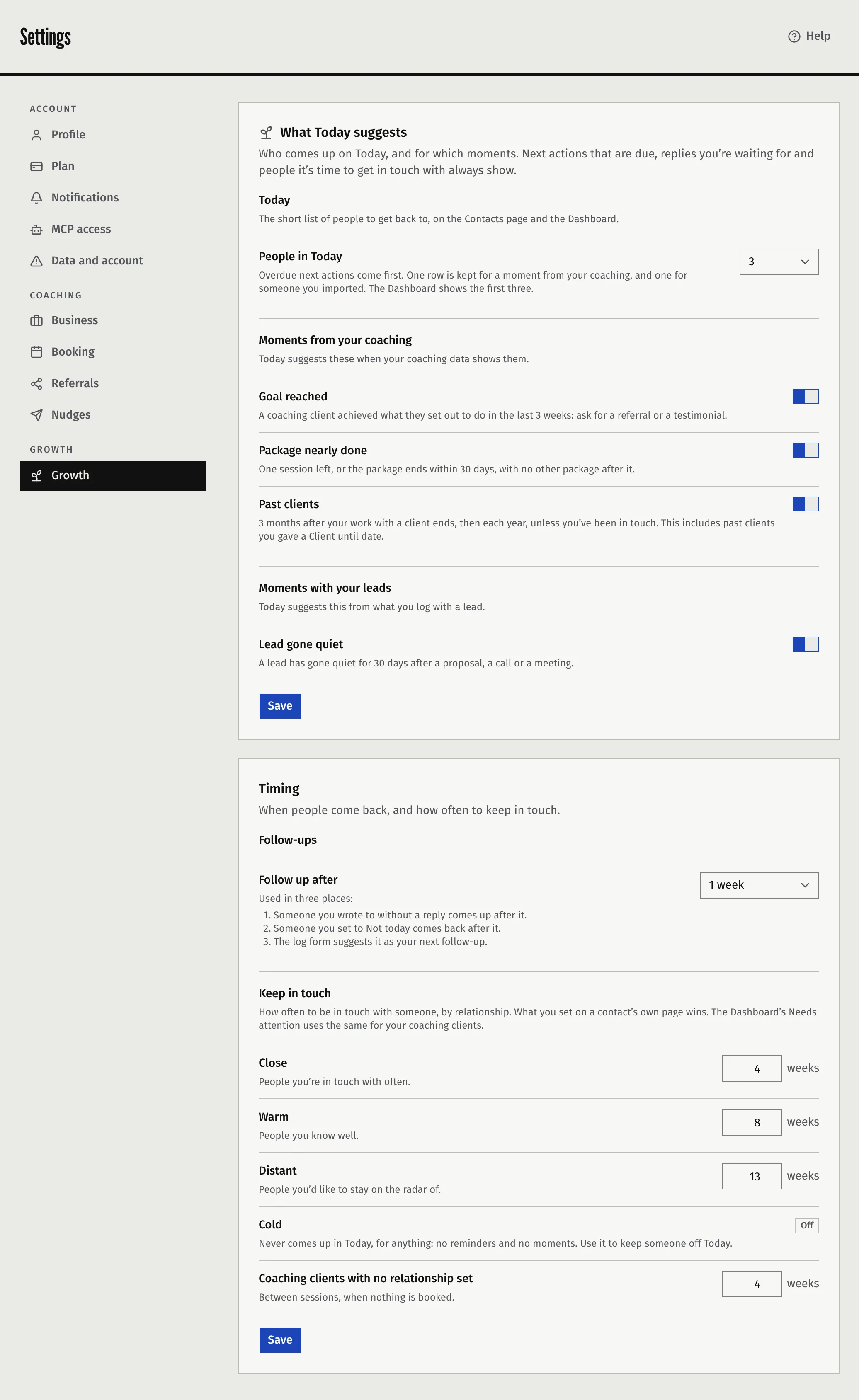
Open Settings, then Growth.
- Under Today, choose People in Today: 3 or 5. The Dashboard always shows the first three.
- Under Moments from your coaching, switch the moments on or off.
- Under Moments with your leads, switch the lead moment on or off.
- Press Save.
- Under Timing, choose Follow up after: 3 days, 1 week, 2 weeks or 3 weeks. Press Save in that card.
Due next actions, replies you are waiting for and people it’s time to get in touch with always show. You cannot switch those off.
The working lists below Today
Under Today, three filters on the list help you work through the rest: Next action due, Waiting for a reply and Time to get in touch. This week counts what you did and how people answered.
Was this article helpful?