Why a client shows up in Needs attention
On this page
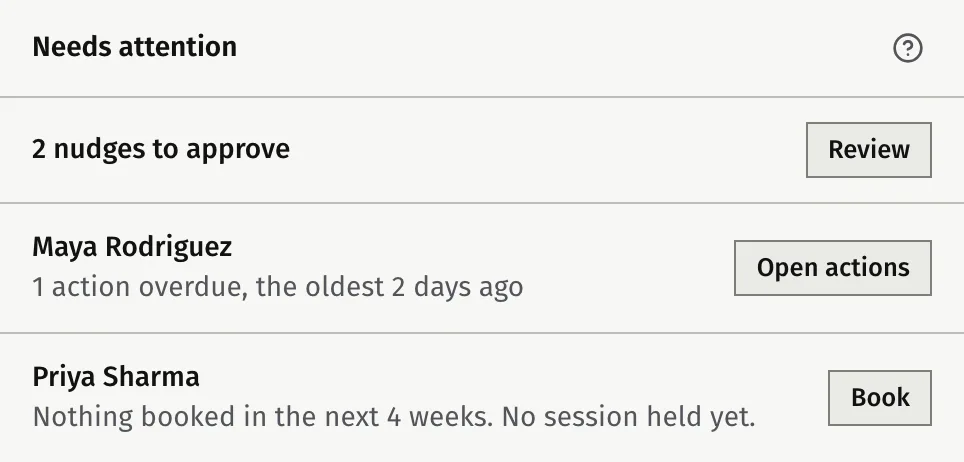
Needs attention is a card on your Dashboard that lists the current clients who need something from you now. Each row has the reason and one button to act on it.
What the card lists
- It lists active clients only. A client you marked as a past client never appears.
- There is one row per client. A row shows up to two reasons, the most urgent first.
- Rows are sorted by their most urgent reason, then by name. Within overdue actions, the oldest due date comes first.
- The nudges waiting for your approval come first, as one row with Review. See Send follow-up nudges you approve.
- The card shows four rows, then an “and n more” line that opens the rest in place. It lists up to 50 clients. Beyond that, All clients takes you to your client list.
When nobody needs you, the card says so. The question-mark button on the card (Why is someone here?) lists the reasons in short.
The reasons
| Reason | When it applies | What clears it |
|---|---|---|
| Overdue actions | The client has an open action, assigned to them, with a due date before today. Today is your own calendar day. The row gives the count and how long the oldest has been overdue. | The action is ticked off, cancelled or deleted, or its due date moves to today or later. |
| Nothing booked | No session is booked in the next 4 weeks (28 days). The row says when the last session was, or that none has been held yet. A booked session counts until it has ended. | A session is booked within the next 4 weeks. |
| Time to get in touch | A session is booked, but more than 7 days away, and it has been longer than your rhythm since you last touched this client. The row gives the weeks since and your rhythm. | You touch the client, or a session is booked within 7 days. |
| Package low | The client has exactly 1 session left on their active packages. A package with unlimited sessions switches this reason off. | The count is no longer 1: you offer another package, or the last session is used. |
Actions you own do not count as overdue here. They are in My actions. See Work with goals and actions.
How “Time to get in touch” is worked out
The last time you touched a client is the latest of these:
- the last session you held with them
- the last nudge sent to them
- the last message, call or meeting you logged on their contact in Growth, if they have one
- the day you added them
The rhythm is the same one Growth uses to remind you about people. By default it is every 4 weeks for a coaching client. You can change it for all clients under Settings, then Growth, or for one client on their contact. If you set a contact’s rhythm to none, this reason never shows for them. See Set how often to stay in touch.
A client with no session booked in the next 4 weeks gets Nothing booked instead, and a client with a session in the next 7 days is never listed for time to get in touch.
What the button on each row does
The button follows the first reason on the row, in this order of urgency: overdue actions, nothing booked, time to get in touch, package low.
| First reason | Button | What it does |
|---|---|---|
| Overdue actions | Open actions | Opens the client’s Actions tab. |
| Nothing booked, or time to get in touch | Book | Opens the booking window for that client. It proposes the same weekday and time as their last session. You can change it. See Book, move and cancel a session. |
| Package low | Offer package | Opens the window to assign a package to the client. |
Clicking the client’s name or reason opens their page.
How a row clears
There is no dismiss or snooze. A row goes when none of its reasons is true any more.
Needs attention and Today
Needs attention is about your coaching clients. Today in Growth is about people who are not clients yet, and Contacts to follow up on the Dashboard leaves out anyone already listed here. See Who to get back to: Today.
Was this article helpful?