Turn a contact into a client
On this page
When someone you know agrees to work with you, you make them a client. You choose how: you coach them in Faronto, or they are a client for something else, such as consulting or a workshop. In both cases the person stays in Contacts, so the history of how you got to know them stays with them.
Make a contact a client
- Open the contact from Contacts.
- Press Make client.
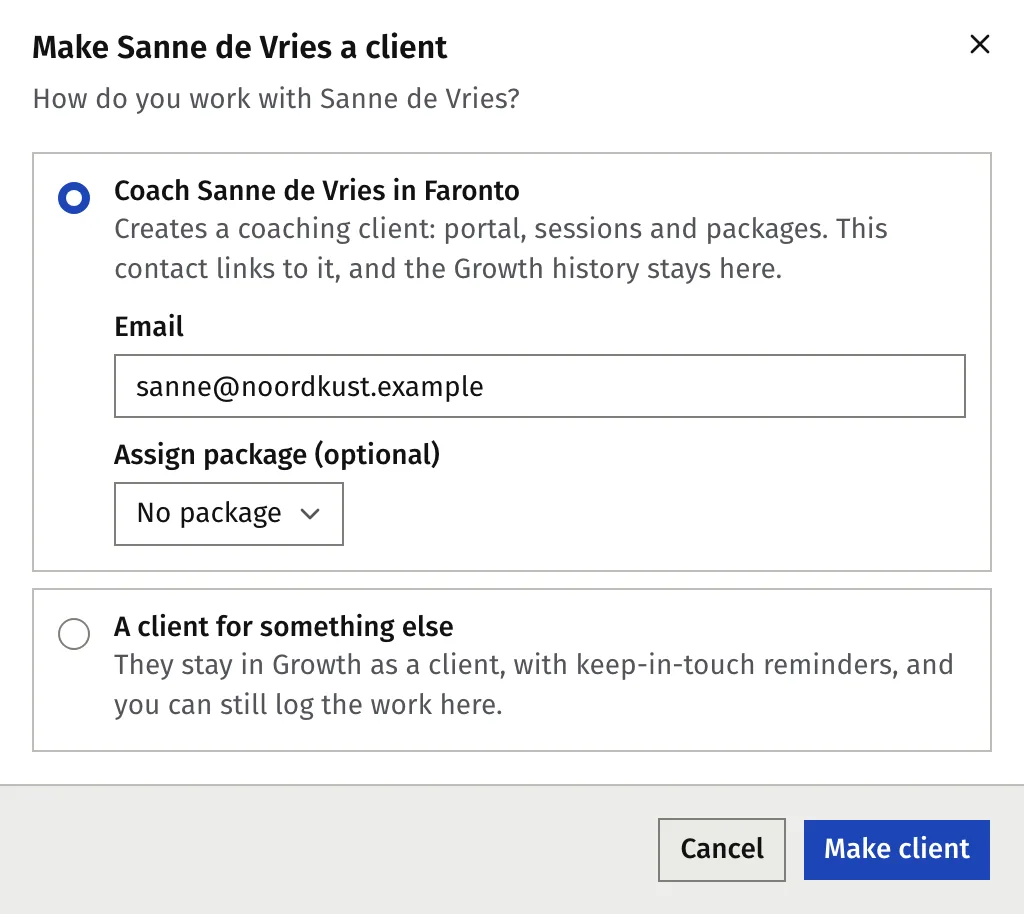
- Faronto asks How do you work with …? Choose one:
- Coach … in Faronto. Creates a coaching client with a portal, sessions and packages. The contact links to it, and the Growth history stays on the contact.
- A client for something else. They stay in Growth as a client with keep-in-touch reminders, and you can still log the work here. No coaching client is created.
- Fill in what your choice asks for, in the same window. Both are below.
- Press Make client. To stop, press Cancel.
Coach them in Faronto
When you choose Coach … in Faronto, the client’s details appear below the choice.
- Check the Email. A client signs in with their email, so it is required. If a client with that email already exists, Faronto links this contact to that client instead of creating a second one.
- Optional: choose a package under Assign package (optional).
- If you coach in more than one language, choose the Coaching language.
- Press Make client.
The contact stays in Contacts, linked to the new client. Nothing is sent to the person. When you are ready, invite them to the portal from the client’s page. See Add a client and invite them to the portal.
From then on, the client’s name, email and phone live on the client’s page. Edit them there. The contact’s stage follows the client: Client while coaching is active.
A client for something else
- Under Client work, type what they are a client for, for example Consulting. Faronto suggests labels you used before. The first time, it suggests Consulting, Workshops, Speaking and Training.
- Press Make client.
The label is shown in the list under Client work. It is only a label, up to 60 characters. Faronto does not act on its text. You can still coach this person in Faronto later: open the contact and press Coach … in Faronto.
When coaching ends
When you mark a coaching client as a past client, their contact becomes a Past client. If you have given them a Client work, because you also work together another way, they stay a current client.
A past client is also your best source of referrals. Today suggests a check-in 3 months after the work ended, then each year. See Who to get back to: Today.
Coach someone again
For a past coaching client, the contact page shows Make client. Faronto asks You coached … before. How do you work with them now?
- Coach … again. Opens their client profile so you can start a new engagement. Their sessions, notes and goals are all still there. Nothing is created twice. Press Open client profile.
- A client for something else. They count as a current client in Growth again, with keep-in-touch reminders. Their coaching stays as it is.
How the Free plan’s limit applies
A coaching client counts toward the active client limit: 2 on Free. A contact does not, and neither does a client for something else.
At the limit, You’ve reached the active client limit for your current plan. Upgrade to add more. Upgrade, or mark an earlier client as a past client first. See What’s in Free and Starter.
Was this article helpful?