Ask for referrals and testimonials
On this page
Most new clients come from people who already know your work. A referral or a testimonial is a short, personal ask at the right time. Faronto tells you when a good moment comes, helps you write the ask, and keeps a record of who you asked and what they said.
Faronto never sends the ask. You send it yourself. See Let Faronto draft a message in your voice.
When Faronto suggests an ask
Under Today, a row can carry a moment from your coaching:
- Goal reached. A coaching client reached what they set out to do in the last 3 weeks. The row says it is a good moment to ask for a referral or a testimonial.
- Package nearly done. A client has one session left, or the package ends within 30 days, with no other package after it. The row says it is a good moment to ask how coaching has gone.
- Past clients. Three months after your work ended, then each year, for a month each time. The row says it is a good moment to check in.
- Lead gone quiet. A lead or someone in conversation has been quiet for 30 days after a proposal, a call or a meeting, with no call booked. The row suggests asking whether they are still looking.
Turn any of these off under Settings, Growth. See Who to get back to: Today.
When you press Draft on one of these rows, Faronto sets the purpose of the draft to match: a referral ask after a goal is reached, a testimonial ask when a package is nearly done, and a follow-up when a proposal is open.
Log the ask
After you send it, record it. This keeps your counts right and tells Faronto the moment is handled.
- On the row under Today, press Log. To start from the contact instead, press Log interaction, choose the Type, then What it was for, and write the Summary (optional). Steps 2 to 4 describe the short form on the row.
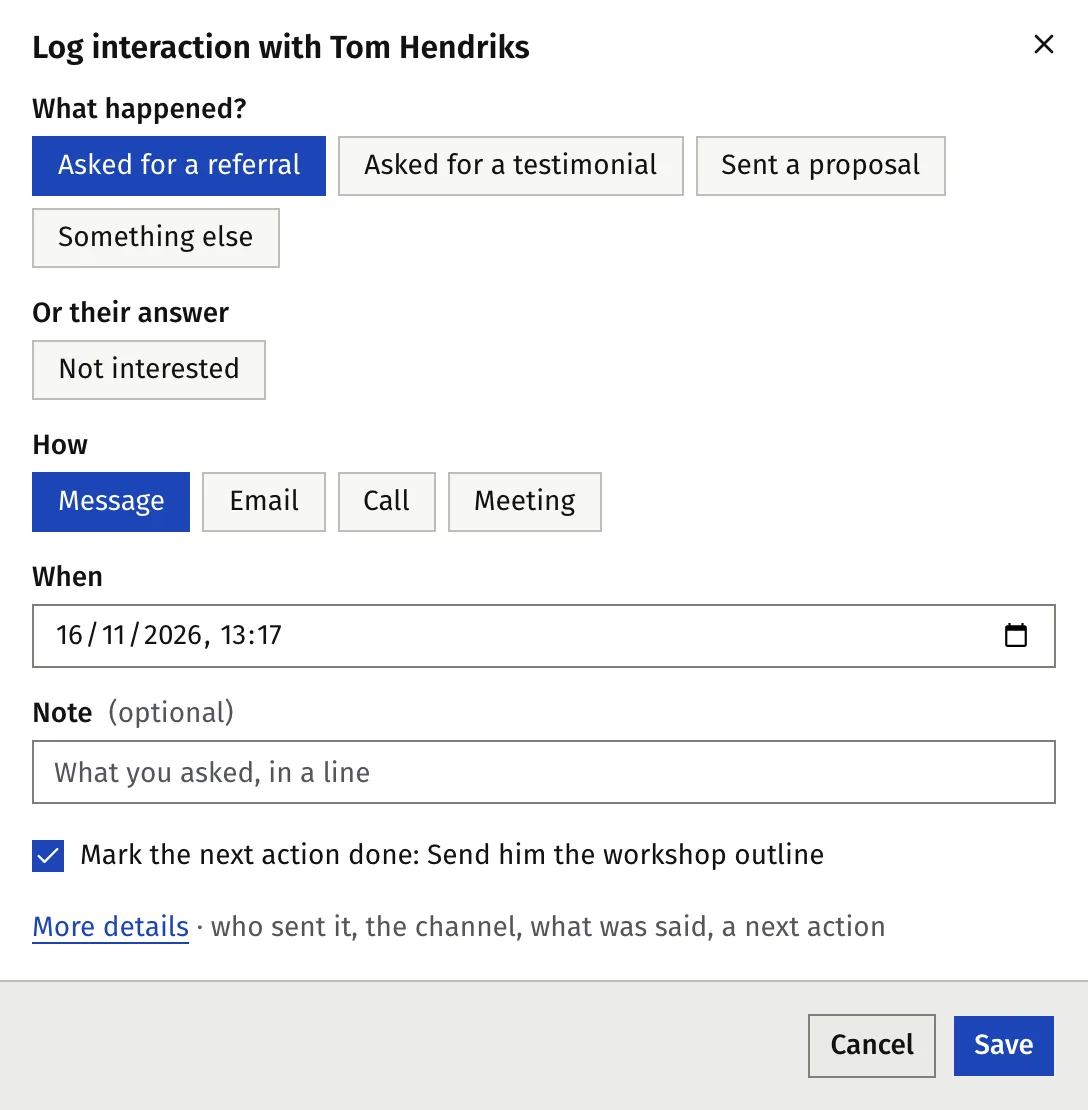
- Under What happened?, choose Asked for a referral, Asked for a testimonial or Sent a proposal.
- Under How, choose Message, Email, Call or Meeting, and set when.
- Add a short Note if you want.
- If the person’s next action is due, the form shows Mark the next action done: …, already ticked. Leave it ticked when the ask was that action.
- Press Save. With the box ticked, the next action is marked done and the person leaves Today. Press Undo in the message that appears to take back both.
The ask appears on the contact’s timeline with a tag, for example “Asked for a referral”, and This week counts it under people asked for a referral or a testimonial.
Record the answer
- They say yes. Log their reply as a message from them. If they name someone, add that person under Contacts and set Referred by to the person who sent them. By who referred them then counts that person under the one who referred them.
- They say no. Under Or their answer, choose Not interested. Add how they told you and what they said, if you want. If their next action is due, the box reads Clear the next action: …, already ticked: saving clears it, and the timeline records Next action cleared: ….
A “no” counts as contact with them. They leave Today until it is time to get in touch again, and their stage does not change. If the person had an open proposal from you, the same choice reads Declined the proposal.
See where your clients come from
- Open Contacts.
- Press Where clients come from.
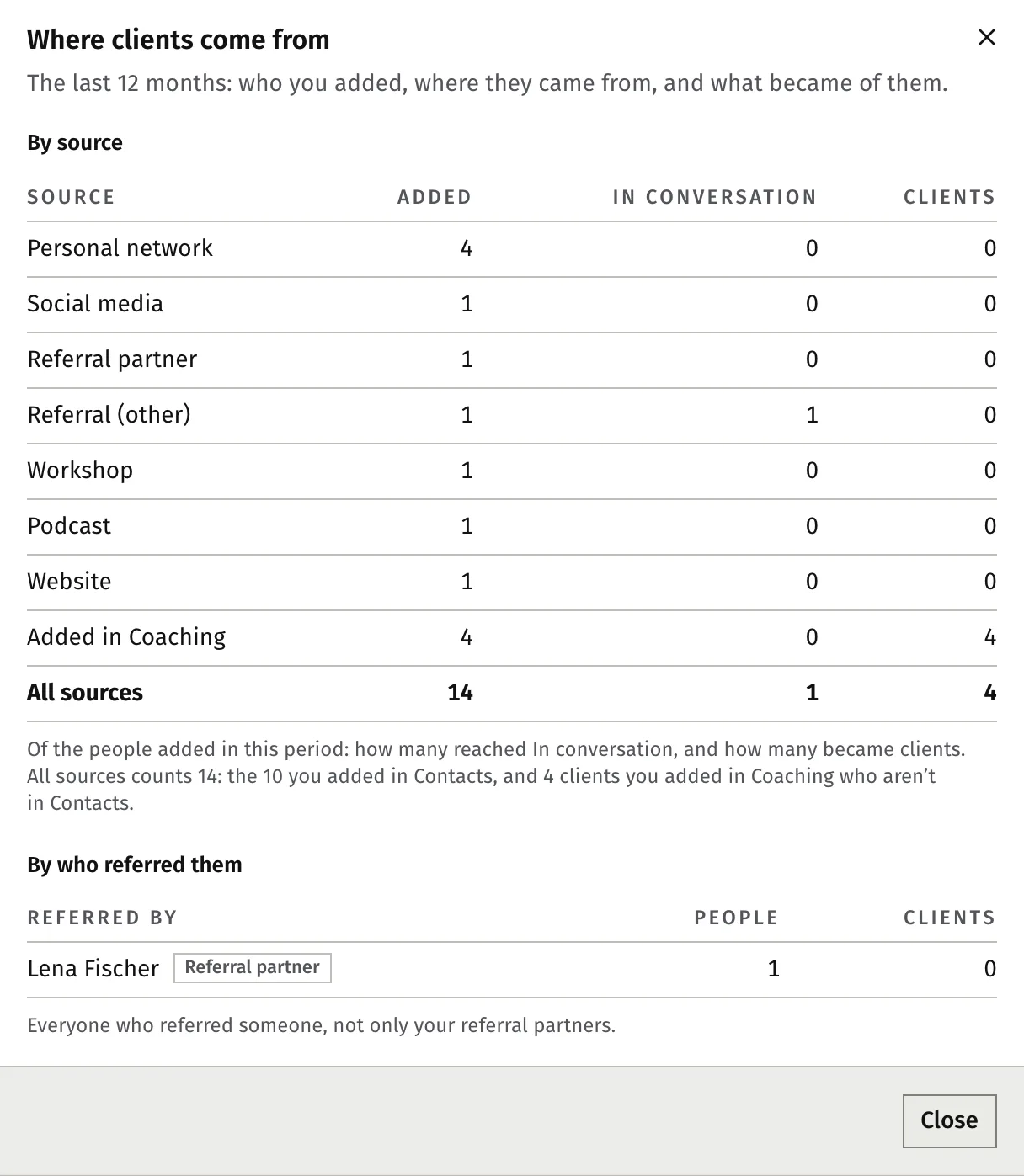
The window covers the last 12 months. By source shows, for each source, how many people you added, how many reached In conversation and how many became clients. By who referred them lists everyone who referred someone, not only your referral partners.
Give people a source when you add or import them. Without one, they show as Not recorded.
Was this article helpful?